whmcs修改默认后台目录
Warning: Undefined variable $output in /home/wwwroot/xiaoyuo.com/wp-content/themes/ripro-child/functions.php on line 68
本文共332个字,预计阅读时间需要1分钟 发布时间: 2024-10-4 共3.43K人阅读
whmcs修改默认后台目录
默认admin后台地址进行爆破的太多了,修改成一个不常见的地址,知识兔可以防住很多自动爆破的工具。
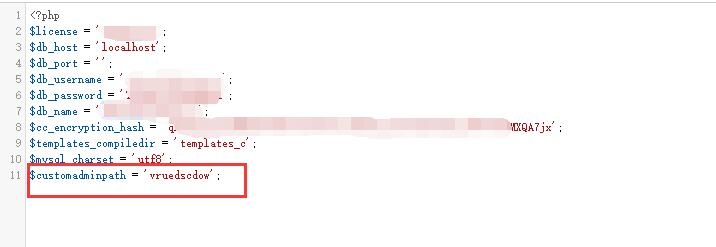
站点根目录有一个configuration.php的配置文件。
在末尾加一个
$customadminpath = '新后台目录名’;
保存即可。
然后知识兔后台原来的admin目录我们改成配置文件里写的目录名。
木路两边的是英文单引号,不要用双引号。网上搜到的都是双引号,会报错的。
参考下图
下载仅供下载体验和测试学习,不得商用和正当使用。
常见问题FAQ
Warning: foreach() argument must be of type array|object, string given in /home/wwwroot/xiaoyuo.com/wp-content/themes/ripro-child/parts/author-box.php on line 12